
New Cwinz Casino Login & Registration Guide
If you want to start playing at New Cwinz Casino and get to your first bet fast, you only need a couple of minutes and your phone. Let’s walk you through New Cwinz Casino registration, login, and verification so you know exactly what to expect at every step.
How to Create an Account at New Cwinz
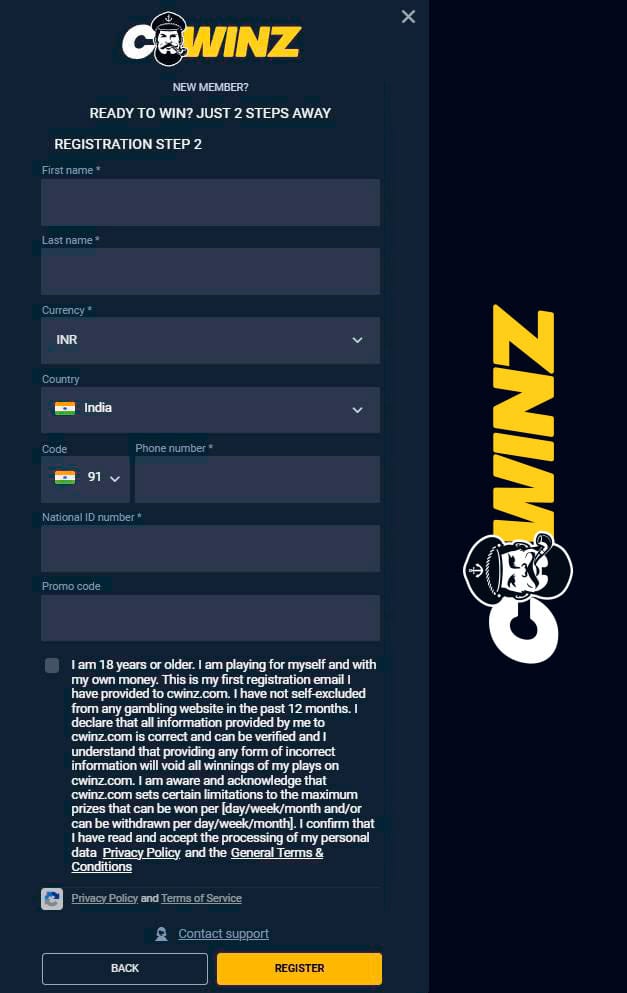
You create your account in two quick steps directly from the homepage using the REGISTER button. You’ll set your login details first, then add your personal info like name, phone, and INR currency.
Step-by-Step Registration Process
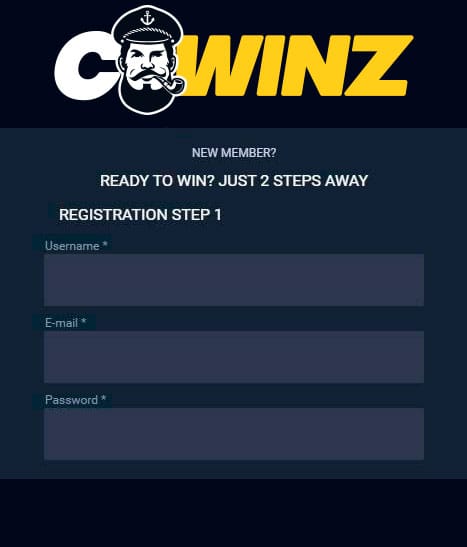
To start, open the Cwinz homepage and hit REGISTER in the top menu next to SIGN IN. You’ll see a small “NEW MEMBER? READY TO WIN? JUST 2 STEPS AWAY” registration window.
Follow these steps to register at New Cwinz:
- Enter a unique username for your New Cwinz account.
- Add a valid email that you can access right now.
- Create a strong password with letters, numbers, and symbols.
- Tick the box to claim the welcome bonus on your first deposit if you want it.
- Click NEXT to move to Step 2 of New Cwinz Casino registration.
- Fill in your first and last name exactly as on your Aadhaar or ID.
- Set your currency to INR and country to India from the dropdowns.
- Add your phone number with +91 and your National ID number.
- Enter a promo code if you have one, then confirm you are 18+ and accept Terms & Conditions.
- Hit REGISTER and wait for the confirmation email from New Cwinz.
Now, once you’ve registered at New Cwinz, your profile will appear in the “My Profile” section with your username and player ID.
Required Personal Information
In Step 2, we ask only for details that are needed for security, payments, and KYC.
You’ll see clearly labeled fields so you always know what you’re entering.
Here’s what you need to provide:
- First name and last name
- Country (India) and currency (INR)
- Phone number with Indian code +91
- National ID number (for Aadhaar, PAN, or other ID)
- Optional promo code
- 18+ confirmation plus agreement with Terms & Conditions and Privacy Policy
Bottom line, if your details match your documents, your future New Cwinz verification will be much smoother.
Email Confirmation & Account Activation
After you complete New Cwinz Casino registration, we send a confirmation link to the email you used in Step 1. You’ll need to confirm that email before you fully jump into deposits and withdrawals.
Typical flow for new accounts:
| Step | What happens | Where |
| 1 | Registration form submitted | Site popup |
| 2 | Confirmation email sent automatically | Your inbox |
| 3 | You click the verify/confirm link | |
| 4 | Account activated, you can sign in | SIGN IN button |
Once your email is confirmed, your new Cwinz login will work across desktop, mobile browser, and the app.
Tips to Complete the Process Smoothly
Most activation issues come from tiny mistakes you can avoid in a second.
Keep it smooth by doing this:
- Use a real email you check daily, not a throwaway address.
- Check Spam/Promotions folders if you don’t see our email in your inbox.
- Open the confirmation link on the same device or browser where you registered, if possible.
- Complete email confirmation before trying to change your password or make a deposit.
If the email did not arrive after a few minutes, you can resend it or reach live chat from the site header.
New Cwinz Verification Procedure (KYC)
Now, let’s talk KYC because that is what unlocks full withdrawals, higher limits, and some promos. In your profile menu, you’ll see “Verify Account” if you’re not verified yet, and that is where New Cwinz verification starts.
Once you click Verify Account in the “My Profile” section, you’ll see your account status as “Account not verified” with a button like “Verify Now”. From there, you’ll be guided to upload your documents and confirm your identity.
How to Upload Aadhaar or ID Proof
You can use Aadhaar, PAN, passport, or another accepted ID, as long as it is valid and matches your profile details. The verification section sits under My Profile → Verify Account in the user profile panel.
To upload documents for New Cwinz verification:
- Go to your avatar/profile icon and open My Profile.
- Select “Verify Account” from the profile navigation list.
- Choose the document type requested (ID card, passport, driver’s licence, etc.).
- Take clear photos of both sides of the ID or a full Aadhaar page where details are readable.
- Upload the files in the required format, making sure all corners and text are visible.
- If asked, upload a selfie or liveness check as shown in the verification window.
- Submit and wait for the status to change from “Account not verified” to verified.
Honestly, if the photos are sharp and the data matches, KYC usually goes through without extra questions.
Why Account Verification Is Important
Verification is not just “extra paperwork”; it is what protects both your money and our platform. Cwinz operates under an Anjouan license and follows KYC and AML policies listed in the Help section.
Verification matters because:
- It confirms you are 18+ and allowed to gamble legally.
- It protects your account from someone else trying to cash out your winnings.
- It is required before big withdrawals or bonus payouts can be processed.
- It helps us keep fraud, multi-accounting, and chargebacks under control.
Bottom line, if you plan real-money play, completing verification early saves you time later when you hit a big win.
New Cwinz Casino Login Guide
Now that registration is clear, let’s dig into how the new Cwinz login works on different devices. You can log in via desktop browser, mobile browser, or through the app on Android.
Login via Desktop Browser
On the desktop, everything you need is sitting at the top of the homepage. You’ll see SIGN IN next to REGISTER in the New Cwinz main navigation bar.
To complete login on desktop:
- Open the main site and click SIGN IN.
- Enter the username or email you used at New Cwinz Casino registration.
- Type your password carefully, paying attention to Caps Lock.
- Confirm if you want the browser to remember you.
- Click the login button to access your profile, balances, and games.
Once logged in, you can open My Profile, deposits, bonuses, and all casino and sports sections from the header.
New Cwinz Login App for Android
Another standout is that we’ve got a dedicated Android app, so your login experience to the New Cwinz app feels smoother and faster. The APK is available from an official download link shown in the footer slider under the “license/app” icon.
Using the New Cwinz app for login on Android:
- Download the APK from the official link on our site (Android icon in the footer slider).
- Allow installs from unknown sources in your Android settings if needed.
- Install and open the app, then log in with the same username/email and password you use on your desktop.
- Your balances, bonuses, and bets sync across web and app because it is the same account.
If you prefer quick access and fewer browser taps, the app is the easiest way to jump into your favorite games.
Common Login Problems and Solutions
Most login issues are simple: wrong password, email typo, or unverified details. The Help Center & FAQ section covers standard fixes and when to contact support.
Typical new Cwinz login issues:
| Problem | Likely cause | What to do |
| “Invalid credentials” | Wrong email/username or password | Use “Change Password” in My Profile or reset via email. |
| Can’t log in after registration | Email not confirmed | Check your inbox and confirm your email. |
| Login blocked or restricted | KYC or security hold | Go to Verify Account or contact support. |
| Logged out repeatedly | Browser cookies/cache issues | Clear cache, re-login, or try another browser. |
If nothing helps, you can use live chat or the “Contact Us” page from the footer, and our team will check your account manually.
Security Features at New Cwinz
We take security seriously so you can focus on winning, not worrying. In your profile, you’ll find options like Two-Step Authentication, change password, deposit limits, and self-exclusion.
Two-Factor Authentication (2FA)
Under My Profile, you’ll see a “Two-Factor Authentication” or “Two-Step Authentication” menu item. This is where you can add an extra login layer beyond your password.
Two-step auth typically lets you:
- Enable an additional code (for example, via an app or SMS) on login.
- Reduce the chance of someone entering just your password and getting in.
- Combine with deposit, bet, and time-out limits for more control over your play.
Big plus, once you switch that on, your New Cwinz Casino login is a lot harder for anyone else to crack.
Password Reset and Account Protection
If you ever feel something is off with your account, you can act fast from the profile area. The “Change Password” option sits under My Profile alongside Verify Account and Self-Exclusion.
For a safer New Cwinz Casino login:
- Use “Change Password” regularly and avoid reusing passwords from other sites.
- Don’t share your login details with anyone, including “tipsters” or “agents”.
- Set deposit and bet limits if you want extra control over your spending.
- Use Time-Out or Self-Exclusion if you need a break from playing.
Bottom line, we give you the tools to lock your account down; you just need a couple of clicks to switch them on.

Frequently Asked Questions
You can deposit and play before full KYC in many cases, but verification is required for higher withdrawal limits and some promotions like Verified Member rewards.
It usually depends on document quality and volume, but standard KYC checks are processed as quickly as possible once you upload clear ID photos.
No, Terms & Conditions allow only one account per person, and multiple accounts can lead to closure and cancelled bonuses.
Yes, the Android APK is linked from our official site and runs under the same licensed and regulated platform as the desktop version.
Use the password reset or “Change Password” functions via your profile or the login screen and follow the instructions sent to your registered email.
Once you lock your account to INR on registration, the main currency generally stays fixed, so choose INR from the start if you deposit and withdraw in India.
You can open the Help Center & FAQ, use live chat, or click Contact Us in the footer to reach 24/7 support.